

One Prompt. One Hundred Posts.
How I let Claude organise everything.

I typed one sentence. Thirty seconds later, 106 Substack posts were sorted into five clean categories. I didn't write a formula. I didn't build a spreadsheet. I just... asked.
I typed one sentence.
That’s it. One sentence, handed to Claude inside my Cowork session, and within moments — 106 Substack posts were sorted, labelled, and counted across five clean categories.
No formula. No pivot table. No hour spent copying and pasting titles into a spreadsheet while second-guessing which column to use. I just... asked.
This was different.
What came back was a fully structured breakdown — Family Narratives, AI Workflow, Places, Time Period, Community and Admin — with every post placed, cross-category conflicts flagged and a summary count table that immediately told me something I hadn’t known about my own archive: more than half of everything I’ve published sits in the AI Workflow category. The Your Story Matters series alone accounts for 31 family narrative chapters. And Places? Three posts. Three. That’s a gap I hadn’t seen until the moment it was laid out in front of me.
One sentence revealed two years of writing.
If you’ve been building your Substack archive — or your research blog, your family history website, or your digital notes — and it’s starting to feel like a drawer full of unsorted documents, this post is for you. Because what I did is repeatable. And it starts with something far simpler than you might expect.
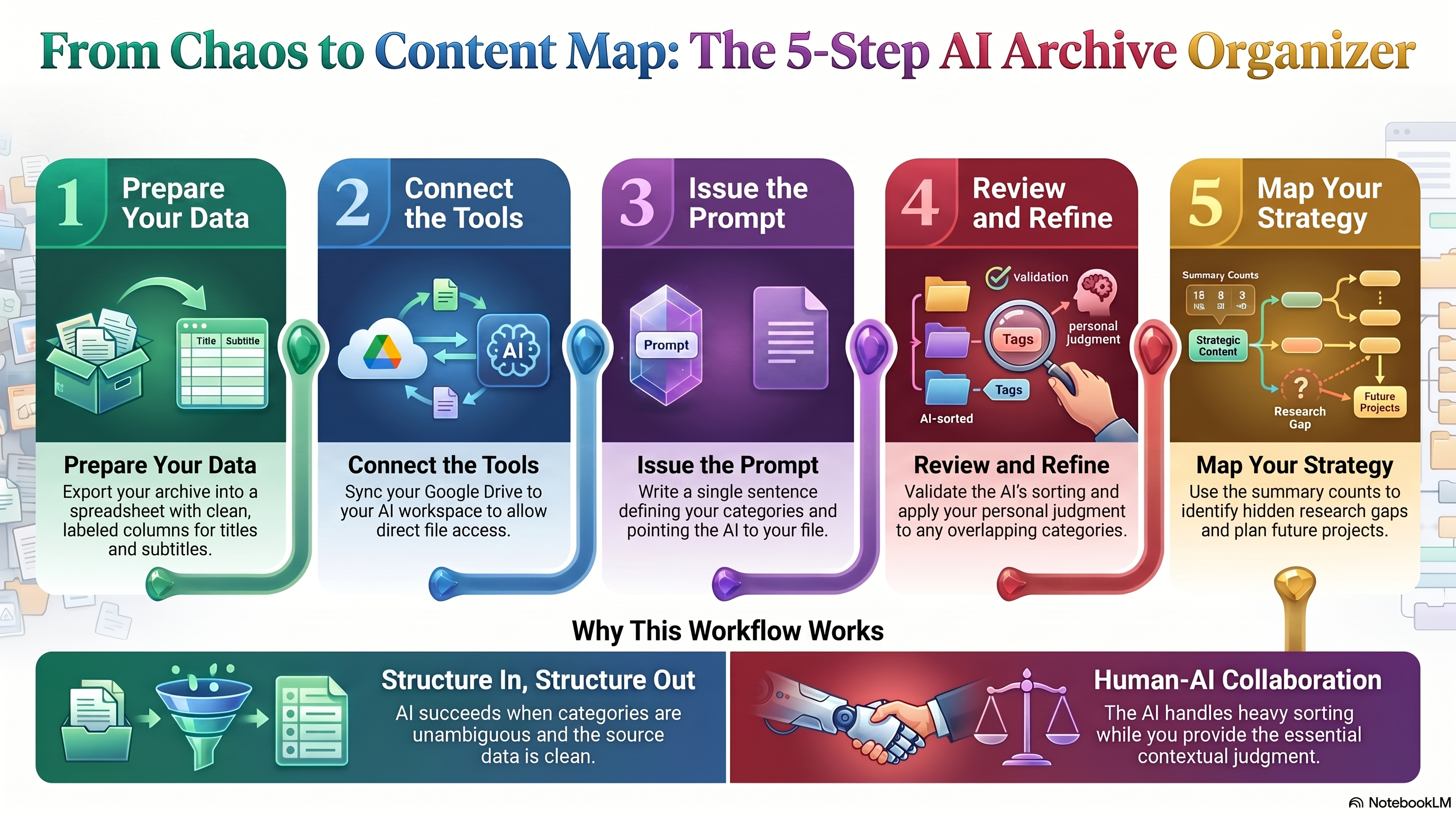
Section 1 — The Purpose
Here’s a question I hadn’t asked myself until recently: what is my archive actually for?
Not why I write; I know that. I write to document, to teach, to share the discoveries that come from sitting at the intersection of ancestral research and artificial intelligence. But the archive — the accumulated body of 106 published posts — what is that for? Who can find what they need inside it? Can I?
The honest answer was ‘not easily’.
Also, I was inspired by a suggestion from Robin Stewart on GenStack that we look back at our writing and try to organise them in some way. Week 3 of this Storyteller Project really leapt off the screen for me. It was exactly what I wanted to do. ‘Consider the writing you have already done.’ Robin suggested creating a collection.
After two years of publishing on NextGenGenealogy, my Substack had grown into something rich and varied. Ancestor stories. AI workflow tutorials. Place studies. Event coverage. Membership announcements. Podcast episodes. A 26-part A to Z challenge. A 15-chapter serialised narrative. The breadth was something I was proud of – but breadth without structure is just volume.
Think of it like a family history box. You know there’s gold in there. Letters, photographs, certificates, newspaper clippings. But if nothing is sorted, nothing is labelled, and there’s no system for finding what you need — the box stays closed more often than it opens. The same is true of an untagged content archive.
I needed categories. Not complicated ones. Not an elaborate taxonomy that would require hours to maintain. Just a clear, practical set of labels that reflected how the content actually grouped – the natural shape of what I’d been writing about.
I settled on five:
Family Narratives — the ancestor stories, memoir chapters, and serialised writing that sit at the heart of this publication. The Your Story Matters series lives here.
AI Workflow — the tutorials, tech tips, prompt strategies, and tool comparisons that help genealogists build repeatable AI skills. The bulk of the archive, as it turned out.
Places — posts centred on a specific location. A place study, a landscape essay, and a heritage site. Geography as the lens.
Time Period — content organised around a particular historical era or event. The Jacobite Uprising. Edwardian England. The coming of the railway.
Community / Admin — the newsletters, membership announcements, event coverage, and housekeeping posts that hold a publication together but don’t fit neatly into research or narrative content.
Five categories. Clean, distinct, and broad enough to hold everything without forcing awkward fits.
The purpose of doing this wasn’t just organisational tidiness — though that mattered. It was strategic. Knowing what I’d written showed me where I’d been generous with my attention and where I’d barely scratched the surface. It gave me a content map. And a content map, for anyone building a body of work over time, is one of the most useful documents you can have.
I just needed a way to build it without spending a weekend doing it manually.
That’s where the workflow began.
Section 2 — The Resources
Before I handed anything to Claude, I needed one thing in place: a clean list of my posts.
Substack makes this straightforward. From your dashboard, you can export your publication data — post titles, dates, subtitles, audience settings, publication status — everything that describes what you’ve published — in a single downloadable file. I’d done this as part of some broader content planning and had the data sitting in a Google Sheet, already formatted into columns: post ID, date, type, title, subtitle, audience, and published status.
That spreadsheet was the only resource required.
No special tools. No developer. No custom integration built from scratch. Just a structured list of posts, organised in a format Claude could read — because I’d connected my Google Drive to my Cowork session, which meant Claude could access the sheet directly when I pointed to it.
That last part is worth pausing on because it’s where a lot of people assume complexity that isn’t there. The connection between Claude and Google Drive is a simple one-time setup within the Cowork interface. Once it’s in place, you reference your file by name, and Claude can read it. No exporting to a different format. No copying and pasting content into a chat window. Just: Here’s the file, here’s the task.
The preparation that made this work wasn’t technical. It was editorial. A clean spreadsheet with consistent column headers and no stray data meant Claude could interpret every row without confusion. Structure in, structure out — that principle holds every time.
If you’re thinking about running a similar workflow on your own content, the resource checklist is short:
An export of your posts or records (Substack, a blog, a research database — whatever you’re working with)
That data formatted into a Google Sheet with clear, labelled columns
A Google Drive connection set up in your AI workspace
That’s the foundation. Everything that follows depends on having it clean and ready.
Section 3 — The Action
Here is the prompt I used. Exactly as I typed it.
“First task is to categorise my Substack posts into these categories: Family Narratives, AI Workflow, Places, Time Period, and Community / Admin. See posts from NextGenGenealogy.”
That’s thirty-one words. No rubric. No examples. No explanation of what each category meant or how to handle edge cases. Just the task, the categories, and a pointer to the data.
What happened next is the part that still impresses me.
Claude read the spreadsheet, worked through every title and subtitle, applied a primary category to each post, flagged the ones that sat naturally across two categories, and returned a fully structured output — organised by category, with series notes included and a summary count table at the end. It also saved the results as a Markdown file, ready to reference or copy back into the spreadsheet.
The whole exchange took under a minute.
Now, I want to be clear about why this worked — because the prompt didn’t succeed by magic. It succeeded because the categories were unambiguous and the data was clean. Claude had enough information in each post title and subtitle to make a confident judgement call. Where two categories genuinely overlapped — a podcast episode about Leith Hall that was equally a Place study and a Time Period piece — it said so, rather than forcing a fit.
That’s the behaviour you want from an AI tool in a workflow: decisive where the answer is clear, transparent where it isn’t.
One more thing worth noting: I didn’t ask Claude to explain its reasoning for every decision. I trusted the output, reviewed it, and made two small adjustments in my own editing pass. That’s the right division of labour. AI does the heavy sorting; you bring the contextual judgement that only you have.
One sentence. One pass. Done.
Section 4 — The Outcome
What came back was better than I expected.
Not because it was flashy. Because it was useful.
Claude returned a fully categorised list of all 106 published posts, sorted under five clear headings. Each entry included the post title, any series notes, and the content type — newsletter, podcast, or thread. Where a post straddled two categories, it was flagged with a brief explanation rather than silently forced into one box. That transparency mattered.
Then came the summary table. Five rows. Five numbers. And an immediate reckoning with my own archive.
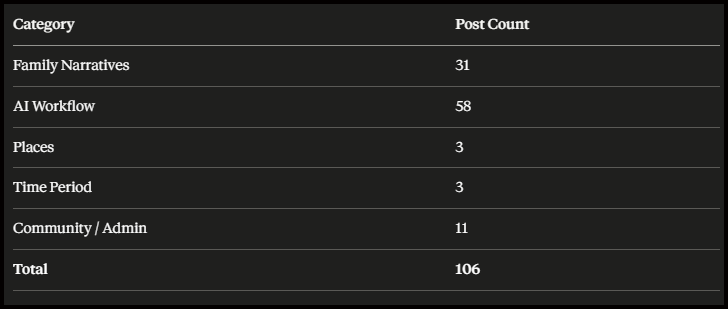
I looked at that table for a long moment.
Fifty-eight posts in AI Workflow. More than half of everything I’ve published sits in a single category. That’s not a problem — it reflects who I am and what this publication is about. But seeing it laid out so starkly was clarifying in a way that two years of publishing hadn’t been.
The Your Story Matters series accounts for the majority of Family Narratives — fifteen serialised chapters, plus a prologue, plus companion pieces. Thirty-one posts in total. A body of ancestral storytelling I hadn’t fully appreciated as a body until I saw it counted.
And then: Places. Three posts. Those three highlighted a gap. Similar for Time Periods, just three. These gaps can be addressed in my next batches of posts.
Six posts across two categories that feel instinctively central to genealogical research. Geography and era are the twin anchors of every family history investigation — and yet they barely registered in my archive. That’s not a failing. It’s a finding. And findings drive decisions.
I now have a content map. I know where I’ve been generous with my attention and where the gaps are. I know which categories could absorb new series, which ones might benefit from a dedicated index page on Substack, and which themes I’ve been weaving through posts without ever naming them explicitly.
The Markdown file Claude saved went straight into my project folder. The category tags are now being added back into the Google Sheet — a living reference I’ll update as new posts are published.
One prompt. One pass. A content strategy I can actually see.
That’s the outcome. Not just a sorted list, but a clearer picture of the work and a sharper sense of where it goes next.
Closing Reflection
You don’t need a developer. You don’t need a database. You don’t need a weekend.
You need a clean export, a Google Sheet, and one sentence.
The real shift here isn’t technical — it’s strategic. When you can see your archive clearly, you can use it deliberately. You stop publishing into a void and start building something with shape.
That’s what AI does at its best. Not just the AI form of thinking. The clearing away — so you can think better.
Now I need a strategy for categorising my existing posts for a more structured, easy-to-access method of selecting from my 100+ posts, with purpose.
Note: this little project is the forerunner of another sharing project on Substack coming up later in the month. “Letters from the Past” where I team up with Lisa Rex of Ancestor Audit.
Your turn: what categories would make sense for your family history archive? Drop them in the comments. I’d love to see how others are organising years of research and writing. Are you participating in Robin Stewart’s Storyteller Project from Genealogy Matters?
Carole, Great post. I used Cowork to organize and categorize Mom's over 1,000 diary entries giving it the categories just like you did. It was amazing and now I can call up from the database either manually or as Cowork to do it. There are so many uses for AI that we've just scratched the surface.
Even with AI doing the majority of the work, this sounds intense to me. I have over 250 posts on my family history blog. I need to grapple with it sometime though as I really need an index to see what I've covered and what I need to work on.